Rust-DOS
Pentium · 32 MB · Sound Blaster 16 · Gravis Ultrasound
| C:\DESCENT | Descent shareware |
| C:\DUKE3D | Duke Nukem 3D shareware |
Lightning-fast x86 DOS emulator
For all platforms and the web
Rust-DOS
Pentium · 32 MB · Sound Blaster 16 · Gravis Ultrasound
| C:\DESCENT | Descent shareware |
| C:\DUKE3D | Duke Nukem 3D shareware |
New in Rust-DOS
Rust-DOS has a Windows of its own built in. Its KERNEL32, USER32, GDI32, DirectX and the other system DLLs are written into the emulator, as its DOS is. No Windows installation, no disk image, no Windows files: type the game's name at the DOS prompt and it runs.
Experimental: runs fewer games than a Windows installation does
Boot your own Windows 95 or 98 hard disk image, as in DOSBox-X, for the games that need the real thing.
Install Windows 3.1 or 3.11 on the emulated disk and start it from the DOS prompt, as on a 1993 PC.
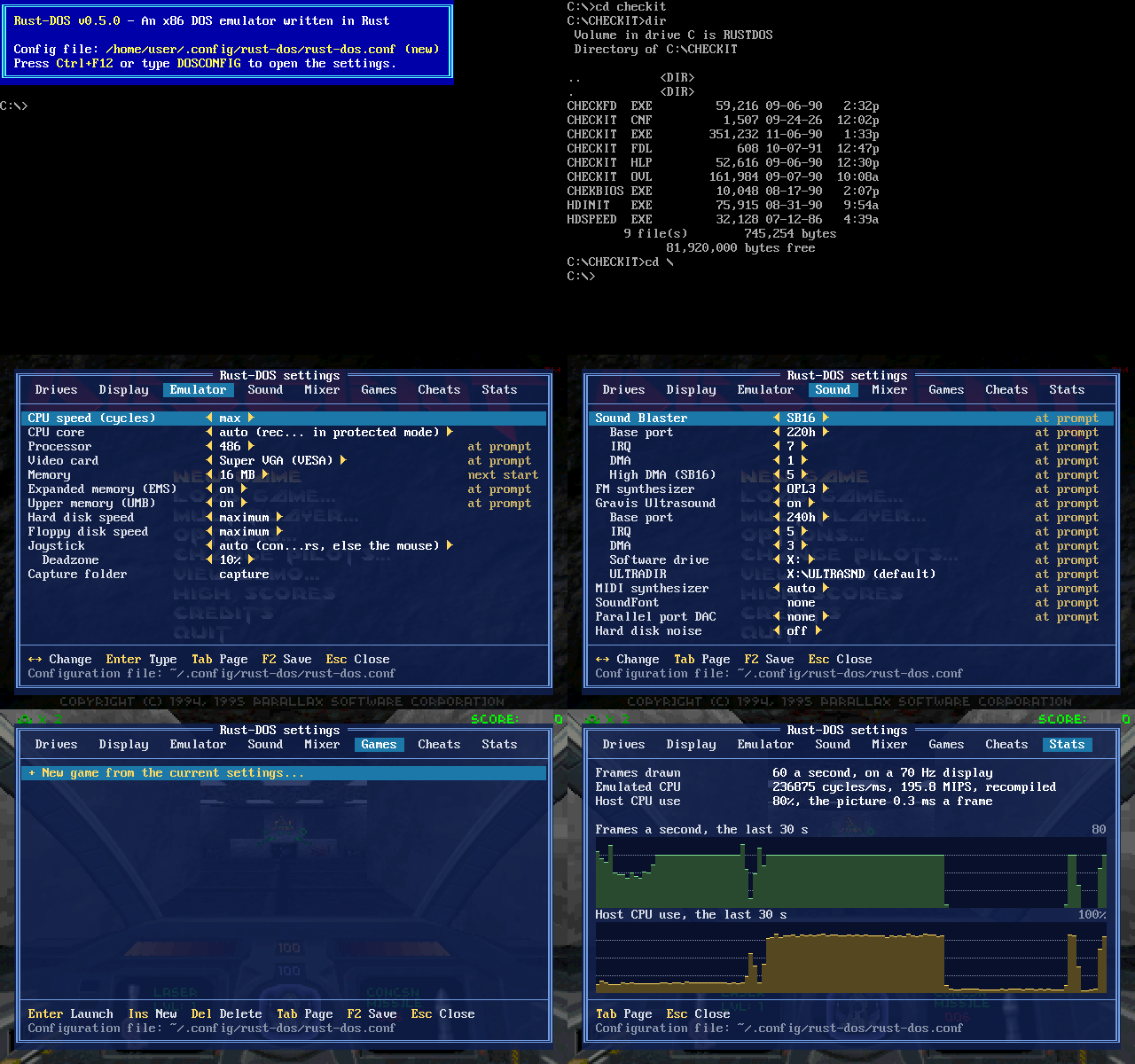
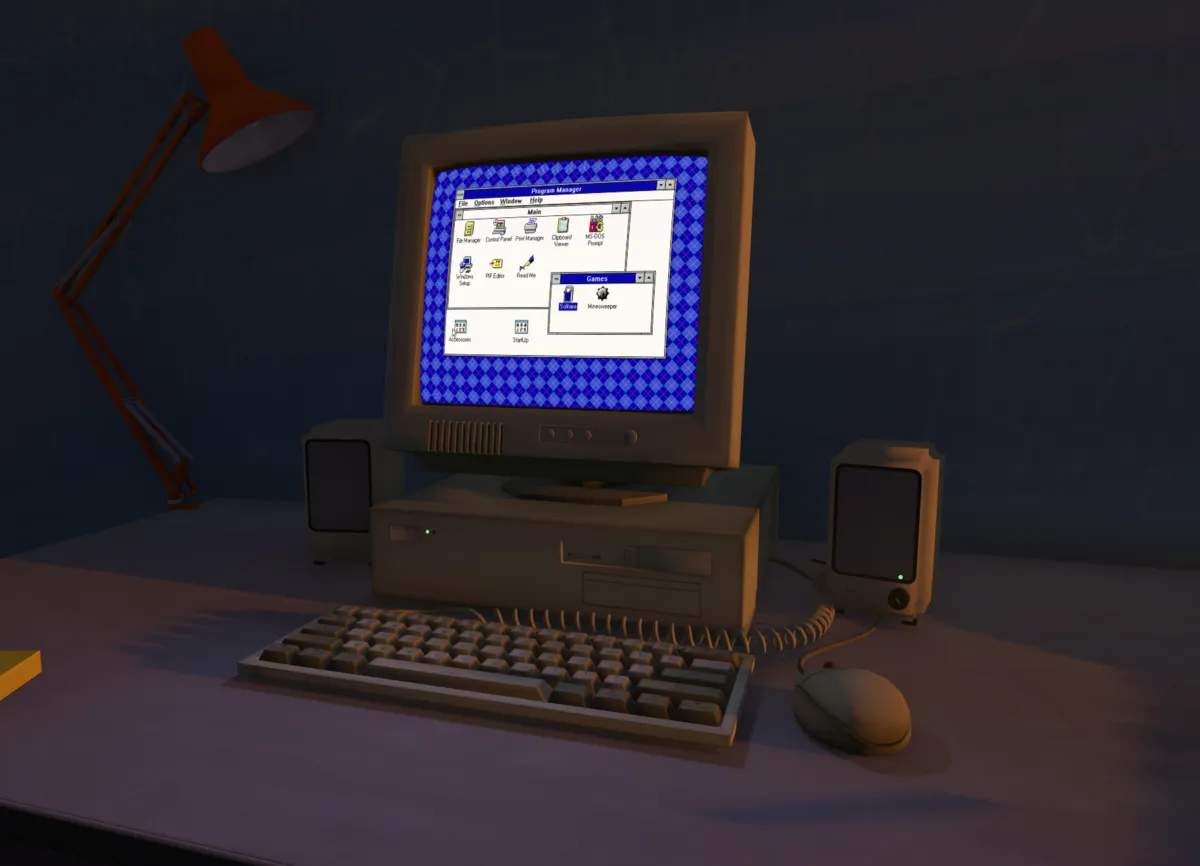
Sit at the PC you had as a kid. Experience immersive 3D scenes on your 2D monitor or in an OpenXR headset and your Steam Frame.
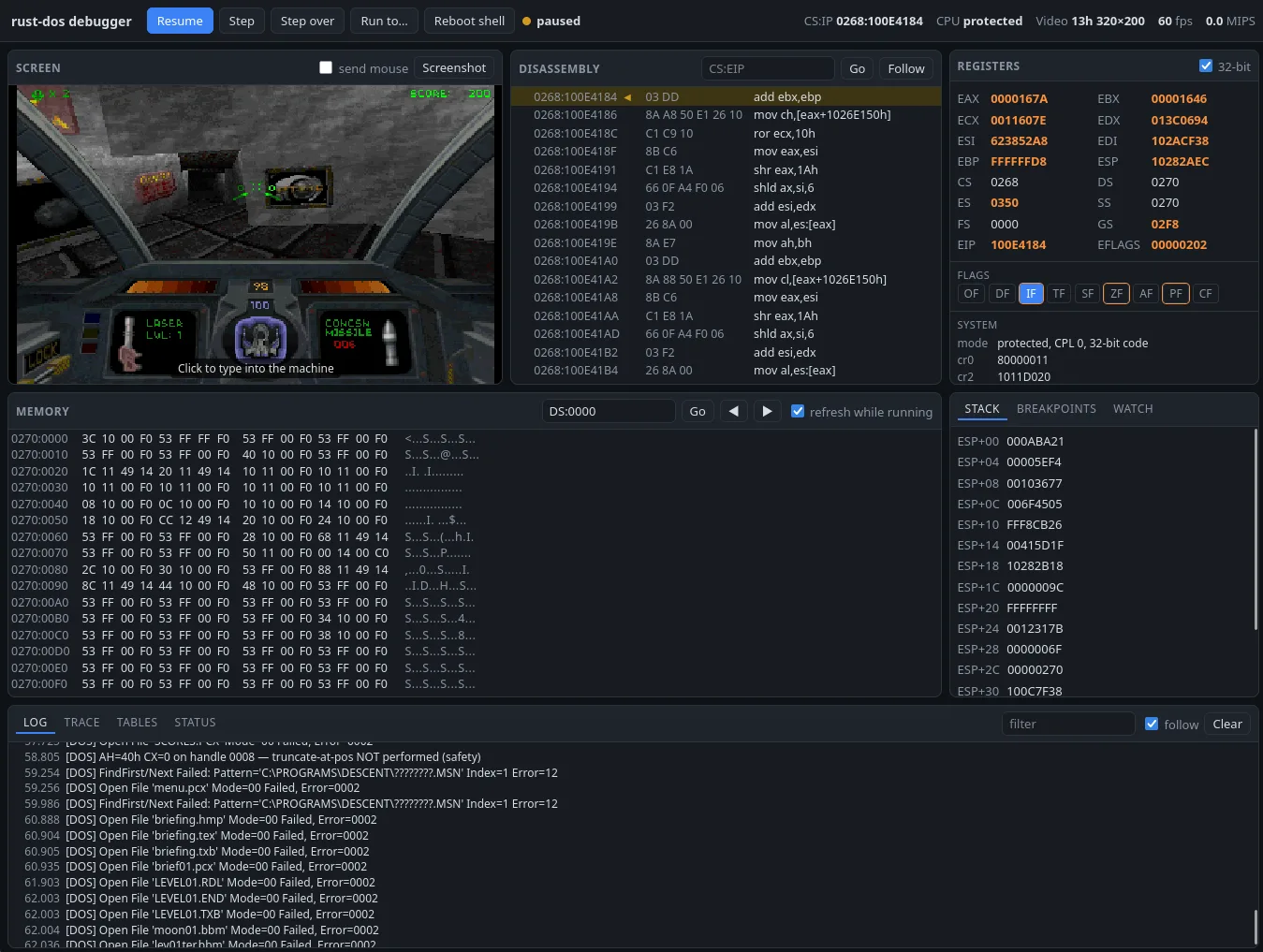
Start Rust-DOS with --debug-server and open the debugger in a browser, or drive the machine from scripts and LLMs over its HTTP API.
Which games work? How fast is it next to DOSBox? Can I play online?
An emulator of a DOS PC, written in Rust, for the games of DOS's golden age: from the early PC games of the 1980s to the 3D games of the late 1990s, and Windows 95 / 98 games, with or without a copy of Windows.
It runs on Windows, macOS and Linux, as a core for RetroArch, and in the browser, as the live demo above does. DOS is built in, so there is nothing else to install: drop a game's folder, a zip or a CD image onto the window and play.
No. The CPU/FPU core, dynamic recompiler, VGA, DPMI, GUS, SoundBlaster, MPU-401, Networking, VR code, etc. is original Rust code.
The parts that were ported from Dosbox-X and Dosbox-Staging are the 3dfx Voodoo core, the S3 Trio 64/ViRGE, and much of the IDE, ATA and ATAPI code. The SoundCanvas code is based on the Nuked-SC55 project. Early versions had a port of the zip handling code from Dosbox-Pure but this was replaced with new Rust code following Rust conventions. Some similarities with Dosbox-Staging exist due to implementation of identical behavior. The disk noise algorithm and sounds are the same as Dosbox-Staging, but then again I've contributed this feature there too.
In any case, these projects are under the same GPL license as Rust-DOS.
Most DOS games, from real-mode games for the 8088 to protected-mode games with DOS extenders such as DOS/4GW. Among them:
Many of these are in Rust-DOS's regression suite, which plays them on 386, 486 and Pentium machines with each sound card and checks that the pictures and sound come out the same every time.
Rust-DOS is still young, and some games may not run properly yet. If yours doesn't, please report it on GitHub.
At the same fixed CPU speed, Rust-DOS, DOSBox-X and DOSBox Staging emulate the same machine and would get the same benchmark scores. What differs is how much of the host's CPU each needs for the same amount of DOS work.
These tables show the Host CPU time on an x86-64 PC, in seconds, at the same fixed speed. Lower is better.
┌─────────────┬──────────┬──────────┬─────────┐
│             │ Rust-DOS │ DOSBox-X │ Staging │
├─────────────┼──────────┼──────────┼─────────┤
│ 3DBench     │     0.80 │     2.18 │    1.54 │
│ Doom        │     3.91 │     4.06 │    4.26 │
│ PC Player   │     2.44 │     3.16 │    3.38 │
│ Chris's 3D  │     0.68 │     1.80 │    0.76 │
│ Quake       │     3.83 │     3.63 │    3.39 │
│ Quake 3dfx  │    27.5  │    35.3  │   86.4  │
└─────────────┴──────────┴──────────┴─────────┘
In most cases Rust-DOS needs the least host CPU: about half of Staging's on 3DBench and a third on Quake with the 3dfx Voodoo, and about a tenth less than Staging on Doom and Chris's 3D. Staging is still faster on software-rendered Quake.
On a Raspberry Pi 5 (ARM64), Rust-DOS needs less CPU than DOSBox Staging on every test, a quarter to two thirds of Staging's time.
┌─────────────┬──────────┬──────────┬──────────┐
│             │ Rust-DOS │  Staging │ ×Staging │
├─────────────┼──────────┼──────────┼──────────┤
│ 3DBench     │     1.51 │     5.59 │     0.27 │
│ Doom        │    11.84 │    19.13 │     0.62 │
│ PC Player   │     7.97 │    17.20 │     0.46 │
│ Chris's 3D  │     1.75 │     4.00 │     0.44 │
│ Quake       │    12.85 │    21.68 │     0.59 │
│ Quake 3dfx  │    74.7  │   112.3  │     0.67 │
└─────────────┴──────────┴──────────┴──────────┘
The maximum emulation speed, flat out at 2,000,000 cycles, shows the frames per second on a x86-64 PC. Higher is better.
┌─────────────┬──────────┬──────────┬─────────┐
│             │ Rust-DOS │ DOSBox-X │ Staging │
├─────────────┼──────────┼──────────┼─────────┤
│ Doom        │  313 fps │  198 fps │ 233 fps │
│ Quake       │  351 fps │  254 fps │ 394 fps │
│ Quake 3dfx  │ 35.9 fps │ 23.4 fps │34.3 fps │
└─────────────┴──────────┴──────────┴─────────┘
AMD Ryzen AI Max+ 395 with Arch Linux, and Raspberry Pi 5 with Debian 12, October 2026. Rust-DOS built after v1.3.0, DOSBox-X 2026.10.01 with its dynamic core running the FPU, DOSBox Staging 0.83.0. An emulated Pentium with the dynamic core, an S3 Trio and an SB16; medians of three runs. Benchmarks from Phil's DOS Benchmark Pack 1.6; Quake 3dfx is QDOS with Glide 3.
Note:These tests are conducted under specific conditions and may not reflect performance in all scenarios. Individual results can vary depending on the hardware and software environment. There may also be programs that could run significantly worse on Rust-DOS due to emulation inaccuracies. If you experience this, please let us know on our GitHub issues page.
DOSBox, DOSBox Staging and DOSBox-X are excellent, and Rust-DOS learned a great deal from them. Rust-DOS puts ease of use first: a game should just work, without reading up on configuration files first.
No. With cycles=auto, the default, Rust-DOS watches the frames a game draws. It speeds the CPU up while the frame rate follows, and stops where it doesn't: where the game caps its own frame rate, or at the display's refresh rate. While a game waits for a key, it slows down again.
There is of course always the option of manually setting the CPU speed using the cycles configuration option.
The floating-point unit (the 387 maths coprocessor) has two modes in Rust-DOS:
Fast results can differ from a real machine's in their last digits, and always round to nearest. Most games never notice. Pick exact if a game draws or behaves oddly in fast mode, or for benchmarks that check the FPU's precision.
In the benchmarks, fast mode took Quake from 1.22 to 1.05 times DOSBox Staging's host CPU, and Chris's 3D from 0.99 to 0.90, with the same scores. On the Raspberry Pi 5, Quake went from 0.59 to 0.56 times Staging's.
Like most settings in Rust-DOS, the FPU mode (fpu in the configuration file) can be changed without restarting.
Rust-DOS instances play IPX games together, as PCs on one network would. They meet in a room at a relay, which passes their traffic on. The public relay, relay.rust-dos.com, is there for everyone, and since every player connects out to it, nobody has to forward a port, set up a VPN or install a network driver.
In the settings window (Ctrl+F12), the Network page lists the rooms on your network and online, and makes new ones, with a password if you like.
Just create or join a lobby, then start the game's network play as usual: IPXSETUP for Doom and Heretic, the game's own setup for the others. Null modem and modem games work between the first two players in a room.
Yes. A game set up for DOSBox, a GOG game or a DOSBox configuration file becomes a game profile with the settings window's Import, or by dropping it onto the window. The profile takes the CPU, memory, video, sound and joystick settings, the drives it mounts and its start commands.
The configuration file is in DOSBox's style, and MOUNT and IMGMOUNT take DOSBox Staging's syntax. A game's files stay as they were installed; its saves and changes go into a folder of their own, and a reset takes the game back.
Yes. With voodoo=true the machine has a 3dfx Voodoo Graphics, for Glide games in DOS and in Windows 95/98, drawn by Rust-DOS or again with OpenGL at up to four times the card's resolution.
Glide games expect a Pentium, so set cpu=pentium as well. Direct3D games under Windows 95/98 run on the emulated S3 ViRGE.
It doesn't need to: Rust-DOS has a Windows of its own built in, its system DLLs written into the emulator as its DOS is. Windows 95 and 98 games and Windows 3.1 programs start from the DOS prompt like DOS games, with DirectX, Glide and OpenGL, their setups, and DirectPlay multiplayer through the lobby. It is experimental and runs fewer games than a real Windows does.
Windows 3.x itself runs from the DOS prompt in normal and 386 enhanced mode, with sound, and with Trumpet Winsock on the NE2000 for the internet.
Windows 95/98 runs from a hard disk image of your own (BOOT, or at every start): with IDE disks and a CD-ROM drive for its 32-bit disk access, Plug and Play, Sound Blaster and GUS, an S3 Trio, the S3 ViRGE for Direct3D and the 3dfx Voodoo. Your folders reach it as extra hard disks or CDs.
Yes. The DOS screen becomes the monitor of a PC in a 3D room, and you sit in front of it. Its picture lights the room, the sound comes from the speakers on the desk, and the power and disk lights work.
With a headset, a controller points a laser at the screen as the mouse, and the thumbsticks and buttons are the joystick. Ctrl+Shift+Home centers the view where you sit.
Headsets that SteamVR or Monado drive through OpenXR, such as the Valve Index, HTC Vive, Varjo and Windows Mixed Reality headsets. On Windows the .msi and the .zip bring the OpenXR loader along; on Linux, install your distribution's openxr package (the .deb recommends it).
The Steam Frame works too, standalone or streamed: see below.
Yes. Rust-DOS runs standalone on the Steam Frame itself with smooth performance, both as a plain 2D window and a 3D VR scene with foveated rendering. Power usage when running standalone on the Steam Frame is around 12-16 Watts with the full "90s bedroom" 3D scene being rendered.
You can also run Rust-DOS on your PC and let SteamVR stream the picture to the headset.
Yes: model your childhood bedroom, or that LAN party, in Blender and export it as glTF. A mesh named screen shows the DOS picture and an empty named spawn is where you sit; speakers, the PC's lights and the rest are optional. The guide to building rooms explains it all, and the repository has an example .blend to start from.
The settings window's VR page also downloads rooms that others have shared, such as the 90s bedroom. Made one you'd like to share? Open an issue on GitHub and it can join the list.
No. Rust-DOS has its own DOS and BIOS: XMS, EMS, a DPMI host for DOS extenders, upper memory, a mouse driver, keyboard layouts and a DOS prompt with batch files, pipes and EDIT. A real MS-DOS boots from a disk image too, for the rare game that wants it.
They all work. The Roland MT-32 is emulated by munt, AWE32 is supported natively, and the Sound Canvas SC-55 by a built-in port of Nuked-SC55. Rust-DOS automatically discovers existing ROMs on your system.
If you own the Sound Canvas SC-55 or the AWE32, Rust-DOS can automatically download their ROMs for you.
Windows (7 and later), macOS (Apple Silicon and Intel) and Linux (x86_64, and ARM64 boards such as the Raspberry Pi), as a libretro core for RetroArch, and in the browser as WebAssembly.
The dynamic recompiler, which runs protected-mode games several times faster, works on both x86-64 and ARM64 hosts.
No. The demo runs from a copy of its disk in memory: what DOS writes to C:, and the save states, are gone when the page closes.
The full web build, rust-dos-<version>-web.zip from the downloads, keeps a 250 MB C: in the browser's storage, and takes files, folders and zip archives dropped onto the page.
First try another machine in the settings window (Ctrl+F12): a 486 instead of a Pentium, less memory, another sound card, or the interpreter instead of the dynamic core.
If it still fails, please open an issue on GitHub with the game's name and version, and attach Rust-DOS.log from the configuration folder. It lists what the game asked for that Rust-DOS doesn't do yet.
Yes. Rust-DOS is free and open source, under the GNU General Public License, version 2 or later. The source is on GitHub, and contributions are welcome.